Vaccinations
The vaccination record lists every vaccine a patient has received, whether given at your clinic or reported from elsewhere. Find it in a patient’s chart under Vaccinations (/patients/[id]/vaccinations).
Who can do this
| Task | Clinic Admin | Receptionist | Doctor | Nurse |
|---|---|---|---|---|
| See a patient’s vaccinations | Yes | Yes | Yes | Yes |
| Record, edit or void a vaccination | Yes | No | Yes | Yes |
| Order a vaccination service | Yes | No | Yes | Yes |
| Register a vaccination service in the catalog | Yes | No | No | No |
| Check vaccination subsidy (VSS) eligibility (Singapore) | Yes | Yes | Yes | Yes |
| See a vaccination’s NIR status (Singapore) | Yes | No | Yes | Yes |
Receptionists see the list but no buttons.
Recording a vaccination
You do not need an open encounter. Clinics record a vaccine given today and also enter a patient’s earlier history. When the patient has a current encounter, the record attaches to it. See Encounters & Clinical Notes.
- Select Record vaccination.
- Choose the Information source: Administered here, Patient-reported or Transcribed from record.
- Choose the Vaccine and enter the Date given. These two are required. Choose Other (not listed) and enter a Vaccine name for a vaccine that is not in the list.
- Optionally enter the Dose number (in series), Route, Site, Dose volume (mL), Lot number, Vial expiry and a Note (optional).
- Select Save vaccination.
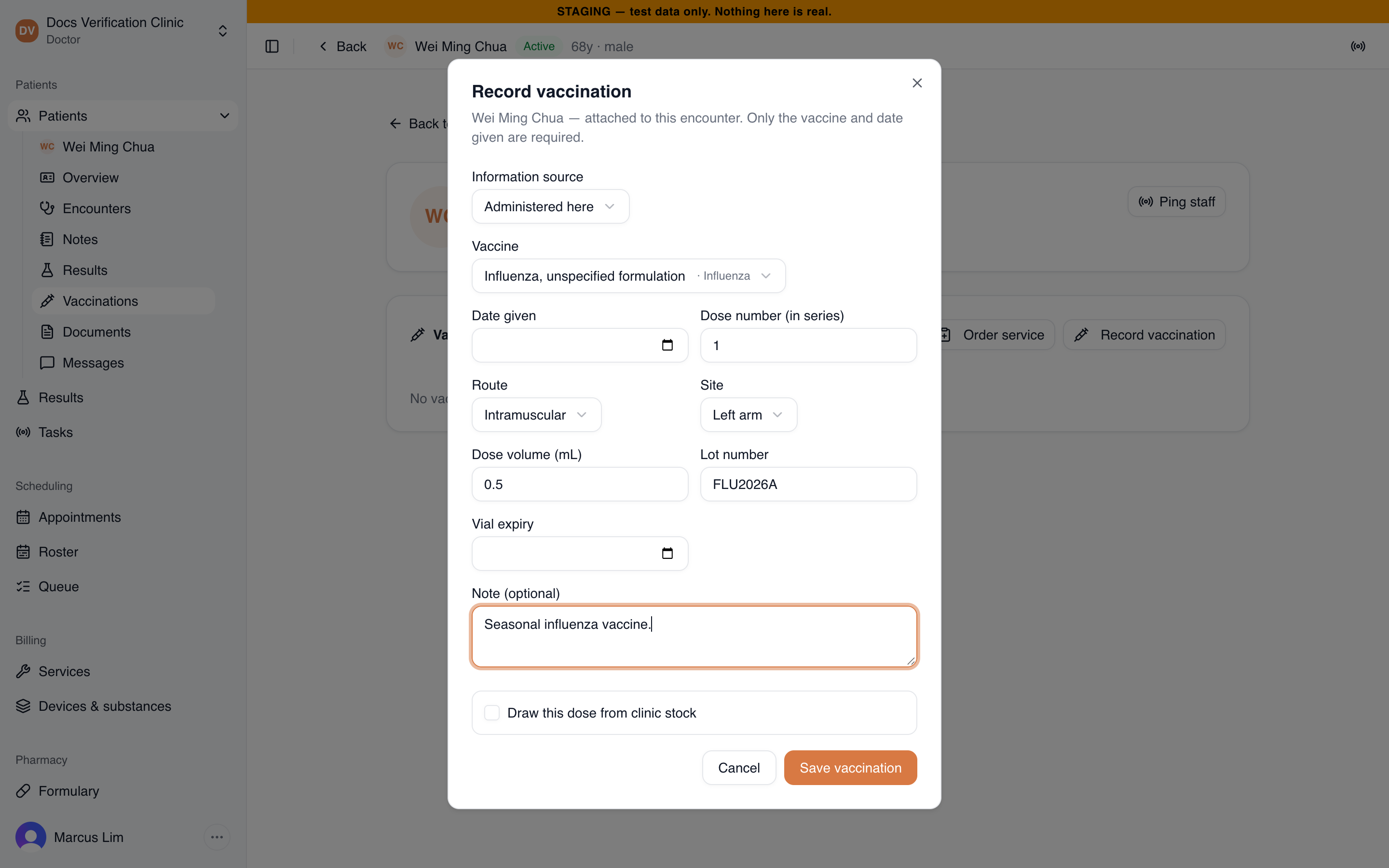
The Record vaccination dialog
The vaccine list covers influenza, COVID-19, hepatitis A and B, MMR, varicella, DTaP, Tdap, Td, tetanus, polio, Hib, pneumococcal (PCV13 and PPSV23), shingles, HPV, rotavirus, meningococcal ACWY and BCG. Vaccines are coded to CVX, the US CDC list of vaccine codes.
| Field | Options and limits |
|---|---|
| Route | Intramuscular, Subcutaneous, Intradermal, Oral, Nasal or Not specified |
| Site | Left arm, Right arm, Left thigh, Right thigh or Not specified |
| Dose volume (mL) | 0.05 to 5 |
| Dose number (in series) | Whole number, 1 to 20 |
| Date given | Not in the future, and not before 1900 |
If you leave a required field out, or enter a date in the future, you see “Select a vaccine.” or “The administration date cannot be in the future.”
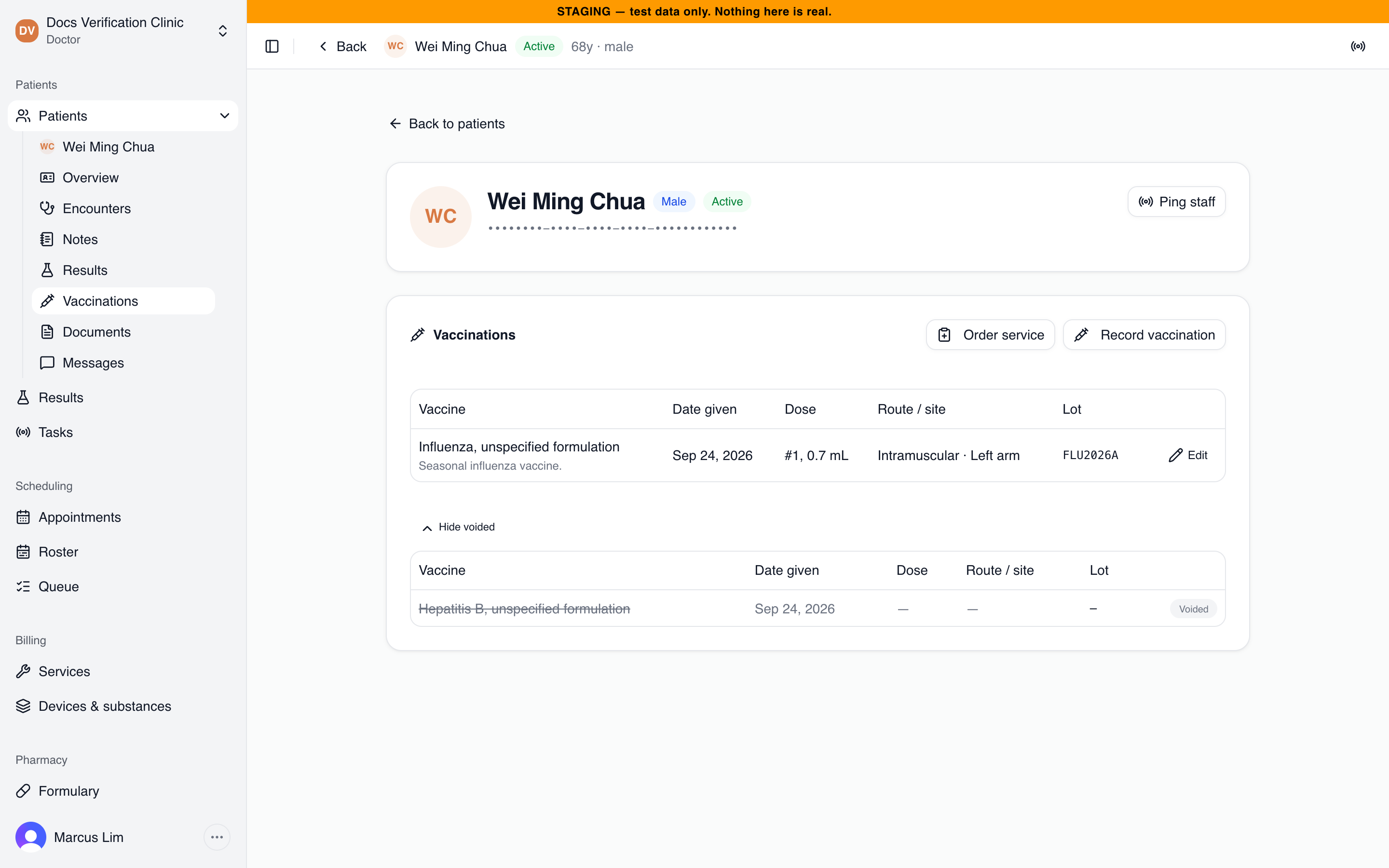
The Vaccinations list
Drawing the dose from clinic stock
Tick Draw this dose from clinic stock to take the dose from your stock. Then choose the Stocked product and the location in Draw from location. The lot number and vial expiry are then filled from the stock instead of typed. The app takes the dose from the lot that expires first and skips expired lots. Two messages can stop the draw:
- “Not enough stock at the selected location to record this dose.”
- “This vaccine is not an active stock item and cannot be drawn from stock.”
See Inventory & Stock.
Vaccination services and orders
A Clinic Admin can register a vaccination service in the catalog so clinical staff can order it during a visit. See Billable Catalog. During an open encounter, select Order service on the Vaccinations page and choose the service. The order appears in the encounter’s Orders card as Active.
When you record the vaccination, choose that order in Service order. The default is Record as clinical history. Saving with an order chosen completes the order in one step, and its status becomes Completed. Vaccination services cannot be added to an order set. See Orders & Order Sets.
Editing and voiding
Select Edit on a row to correct any field and select Save changes. Corrections are versioned and the earlier values are kept for audit. The original giver and the time it was first recorded stay unchanged. If a colleague changed the record after you opened it, you see “This record was changed by someone else. Please reload and try again.”
To void a record, select Edit, then Void record, optionally enter a Reason (optional), and select Void record again. Voiding cannot be undone. The record stays in the chart for audit. It disappears from the main list and appears under Show voided with a Voided label.
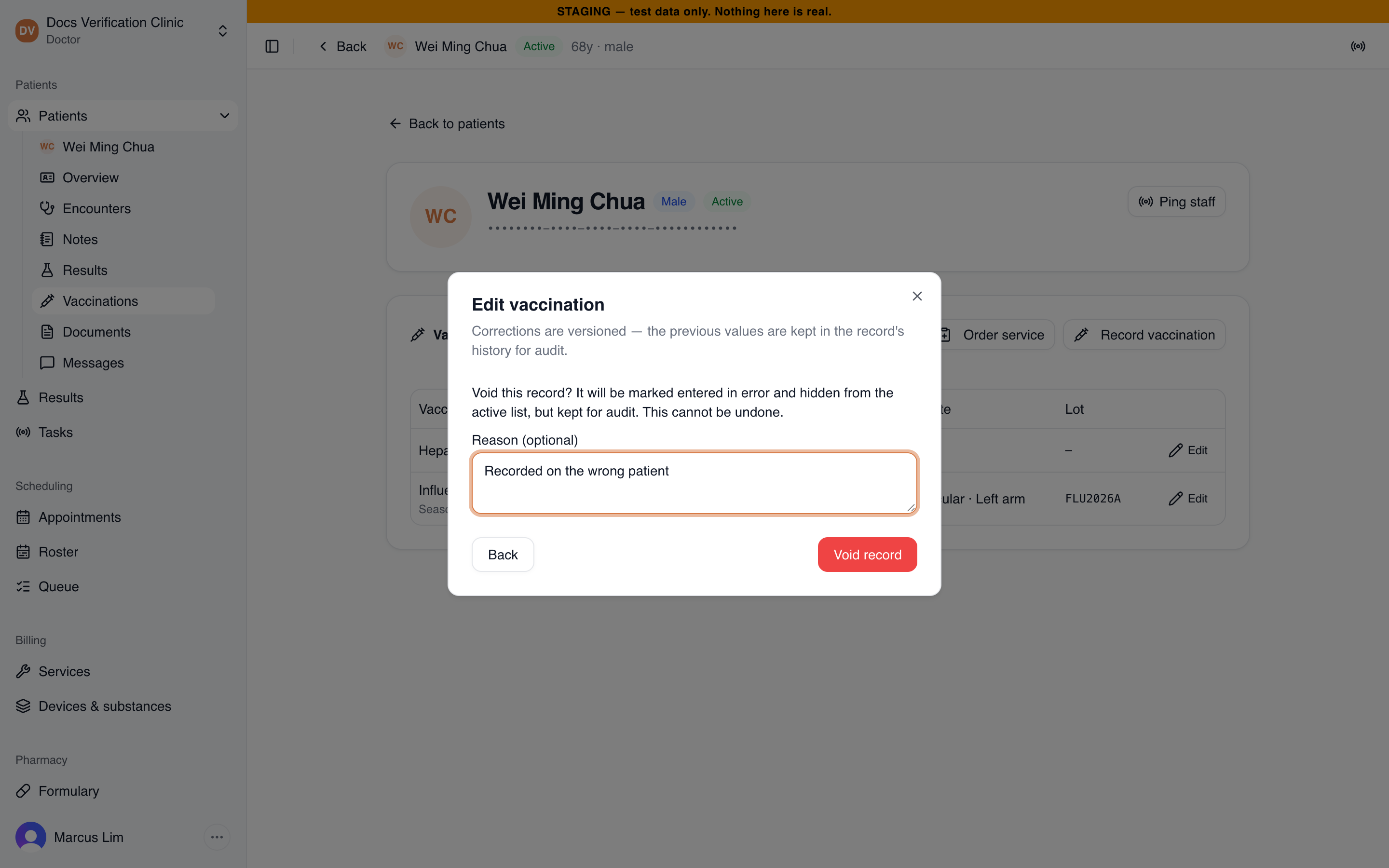
Voiding a vaccination
Voiding a dose that was drawn from stock does not return it to stock. Adjust the stock item yourself if the dose was not given.
Singapore: SDD product, VSS and NIR
These appear only for a Singapore organisation that subscribes to SmartCMS modules.
SDD product
The Record vaccination and Edit dialogs gain an SDD product (optional) field: “Needed for VSS claims and NIR notifications.” It lists the Singapore Drug Dictionary products of the vaccine you chose that are in force on the Date given. Search by brand or code. Choose the vaccine first.
If no product is listed for the vaccine, the field says “No SDD product is listed for this vaccine. It is recorded without one and cannot be claimed under VSS or notified to NIR.” Changing the vaccine or the date drops a product that no longer fits.
A wrong product is refused on save: “That SDD product is not a product of …” or “That SDD product is not on the vaccination product list for the date given.”
Vaccination subsidy (VSS)
For an organisation that subscribes to CHAS, the Vaccination subsidy (VSS) panel sits above the list. Use it before giving the vaccine.
- Choose the Claim code. Codes that match the patient’s latest vaccination with an SDD product are listed first under Suggested.
- Select Check eligibility.
MHCP’s answer is shown as a table, one row per dose:
| Column | What it shows |
|---|---|
| Dose | The dose step. |
| Status | Can be claimed, Claimed or Not eligible. |
| Eligible SDD products | The products MHCP accepts for this dose. |
| Conditions | Any conditions on the subsidy. |
| Fee cap | The most the clinic may charge before subsidy. |
| OOP cap | The most the patient pays out of pocket. |
| Fixed subsidy | The subsidy MHCP pays. |
| Eligible from | The date the dose becomes eligible. |
| NIR records | Matching records in the National Immunisation Registry, and whether each is clinically valid. |
The subsidy is claimed on the visit’s bill. See Claims Workflow.
NIR notifications
For an organisation that subscribes to NIR, the list gains an NIR column. A vaccination Administered here with an SDD product is sent to the National Immunisation Registry without review, at a location connected for NIR. Receptionists do not see the column.
| NIR status | What it means |
|---|---|
| Sending to NIR | Waiting to send, or being sent. |
| Notified NIR | NIR has the record. |
| Not sent: notify NIR directly | Given here without an SDD product. Medbot cannot send it. Notify NIR yourself, or add the SDD product. |
| Prepared by agent: submit or discard | The claims agent prepared it. Someone must submit or discard it. |
| Not confirmed: resend | Medbot cannot tell whether NIR received it. Resend it. |
| Not sent: check and resend | Sending failed. Check the record and resend. |
| Edited after sending: correct in NIR | You edited the record after NIR had it. Medbot cannot send the change, so correct it in NIR directly. |
| Voided after sending: tell NIR | You voided the record after NIR had it. Tell NIR directly. |
| Discarded: not sent to NIR or Expired: not sent to NIR | It was never sent. |
Resend, Submit, Discard and Mark corrected are on Reports.
Related
- Encounters & Clinical Notes
- Inventory & Stock
- Billable Catalog
- Claims Workflow: claim the vaccination subsidy on the bill.
- Reports: follow up NIR notifications.