Vitals
Vitals are a patient’s measurements taken during a visit: blood pressure, heart rate, temperature, oxygen saturation, respiratory rate, pain score, weight and height. Record them from Encounters and read them on the chart Overview (/patients/[id]).
Who can do this
| Task | Clinic Admin | Receptionist | Doctor | Nurse |
|---|---|---|---|---|
| See vitals and their history | Yes | Yes | Yes | Yes |
| Record vitals | Yes | No | Yes | Yes |
| Correct a reading | Yes | No | Yes | Yes |
Receptionists see readings and the Corrected labels but have no Record vitals or Correct buttons.
Recording vitals
- Open the patient’s chart and select Encounters.
- On the open encounter’s row, select Record vitals.
- Fill in the measurements you took. Leave the others blank.
- Select Save vitals.
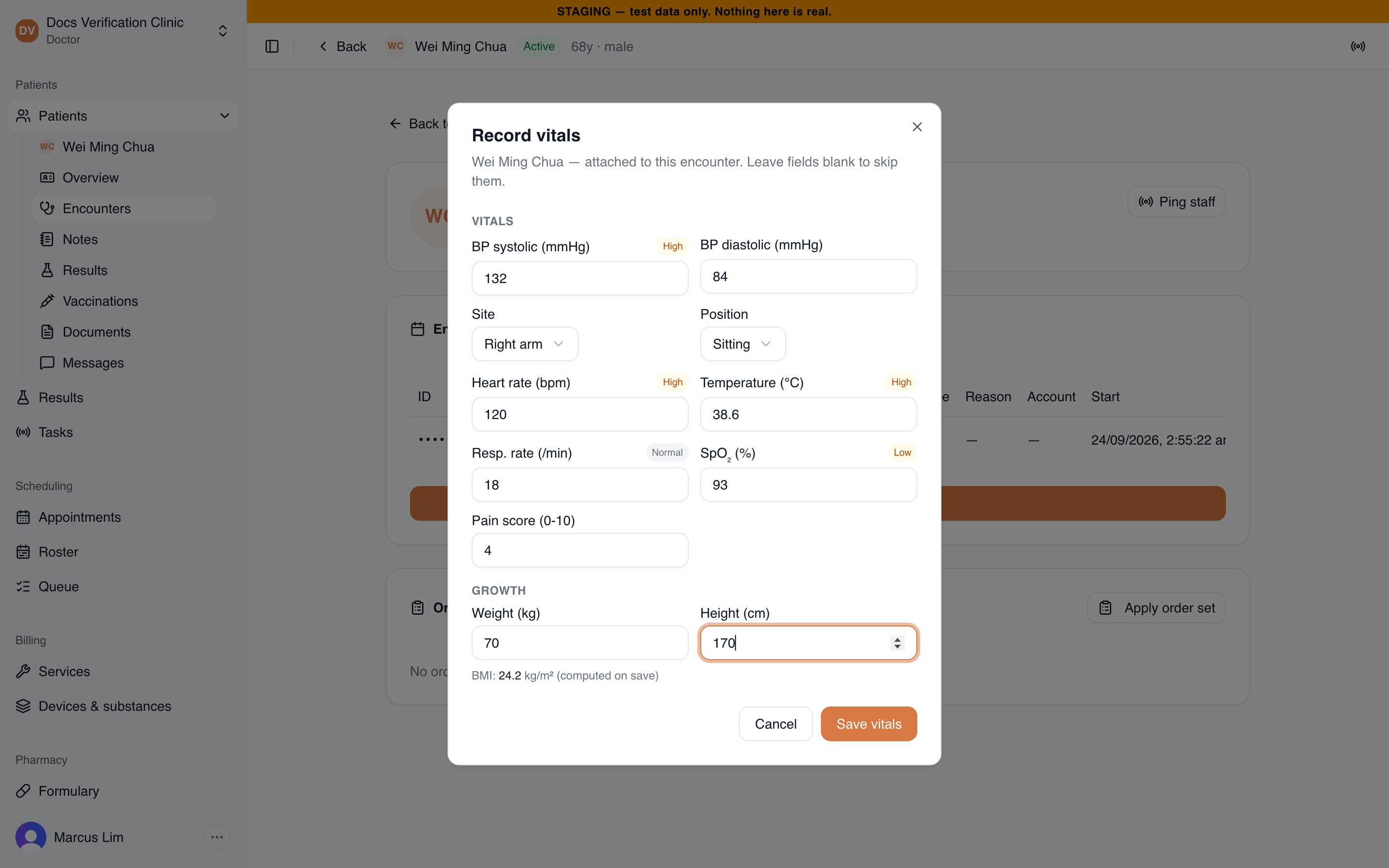
The Record vitals dialog
You can record vitals on an encounter that is Planned, Arrived, Triaged or In Progress. You cannot record on one that is finished, cancelled or entered in error. Recording is allowed on any of these open encounters; the reading attaches to the patient’s current encounter (the most recently started one that is In Progress), which is what the chart shows as the latest value. See Encounters & Clinical Notes.
| Field | Accepted range |
|---|---|
| BP systolic (mmHg) | 50 to 260 |
| BP diastolic (mmHg) | 30 to 160 |
| Heart rate (bpm) | 20 to 250 |
| Temperature (°C) | 30.0 to 43.0 |
| Resp. rate (/min) | 4 to 60 |
| SpO₂ (%) | 40 to 100 |
| Pain score (0-10) | Whole number, 0 to 10 |
| Weight (kg) | 0.3 to 500 |
| Height (cm) | 25 to 250 |
Blood pressure needs both numbers. Choose the Site (Right arm, Left arm, Right leg or Left leg) and Position (Sitting, Supine or Standing). They default to right arm and sitting.
The dialog checks entries as you save. You may see “Systolic of 300 looks implausible (expected 50-260).”, “Enter both systolic and diastolic, or neither.”, “Enter at least one measurement.” or “Pain score must be a whole number.”
When you enter weight and height together, the app calculates BMI from those two numbers and stores it. It never combines a new weight with an older height.
Screening flags
Beside blood pressure, heart rate, temperature, respiratory rate and SpO₂ the dialog and the chart show a flag: Normal, Low, High, Critical low or Critical high. Hover over a flag on the chart to see the range used. Flags use age-based ranges, including children’s ranges for heart rate, respiratory rate and blood pressure. They are screening prompts. They are not diagnoses and not percentile assessments for children.
When a heart rate and a temperature of 38.0 °C or higher are recorded together, the heart rate card can add a note: Proportionate to fever, Tachycardia disproportionate to fever or Relative bradycardia (pulse-temp dissociation). It compares the heart rate with the rate expected for that temperature, using the patient’s earlier readings without fever when there are any. It also lists reasons the comparison may not apply, such as beta blockers, a pacemaker, recent fever medicine, pain or anxiety. The note says it is a screening aid for clinician awareness and not diagnostic.
Reading vitals on the chart
The Vitals card on Overview shows the latest value of each measure with its date, and the site and position for blood pressure. A reading from an earlier visit carries a From previous encounter badge while a newer encounter is open. Cards with three or more readings show a trend line of up to 20 readings.
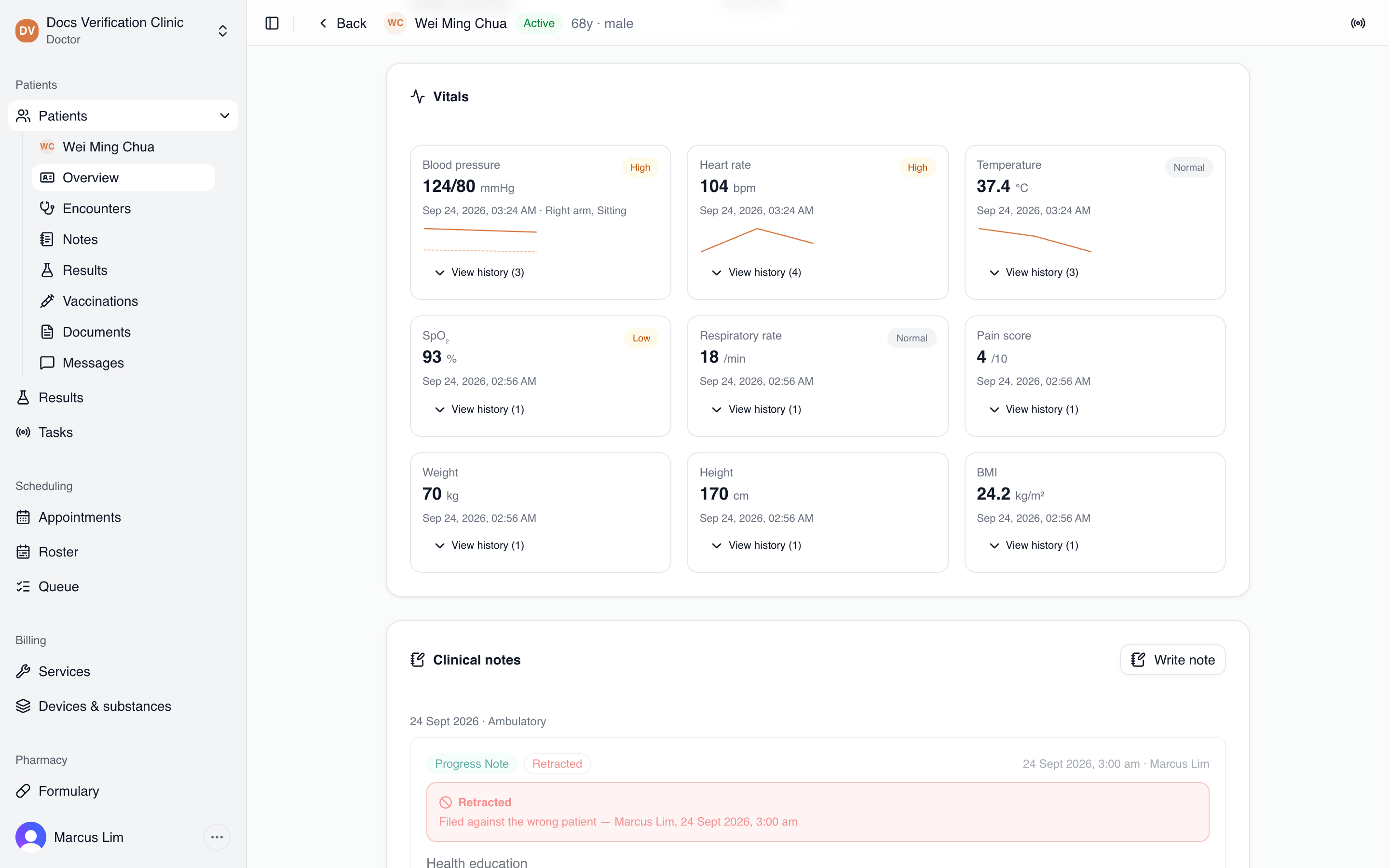
The Vitals card
Select View history on a card to list every reading, newest first.
Correcting a reading
- Select View history on the card, then Correct beside the reading.
- Enter the corrected value (for blood pressure, both numbers) and optionally a Reason (optional).
- Select Save correction.
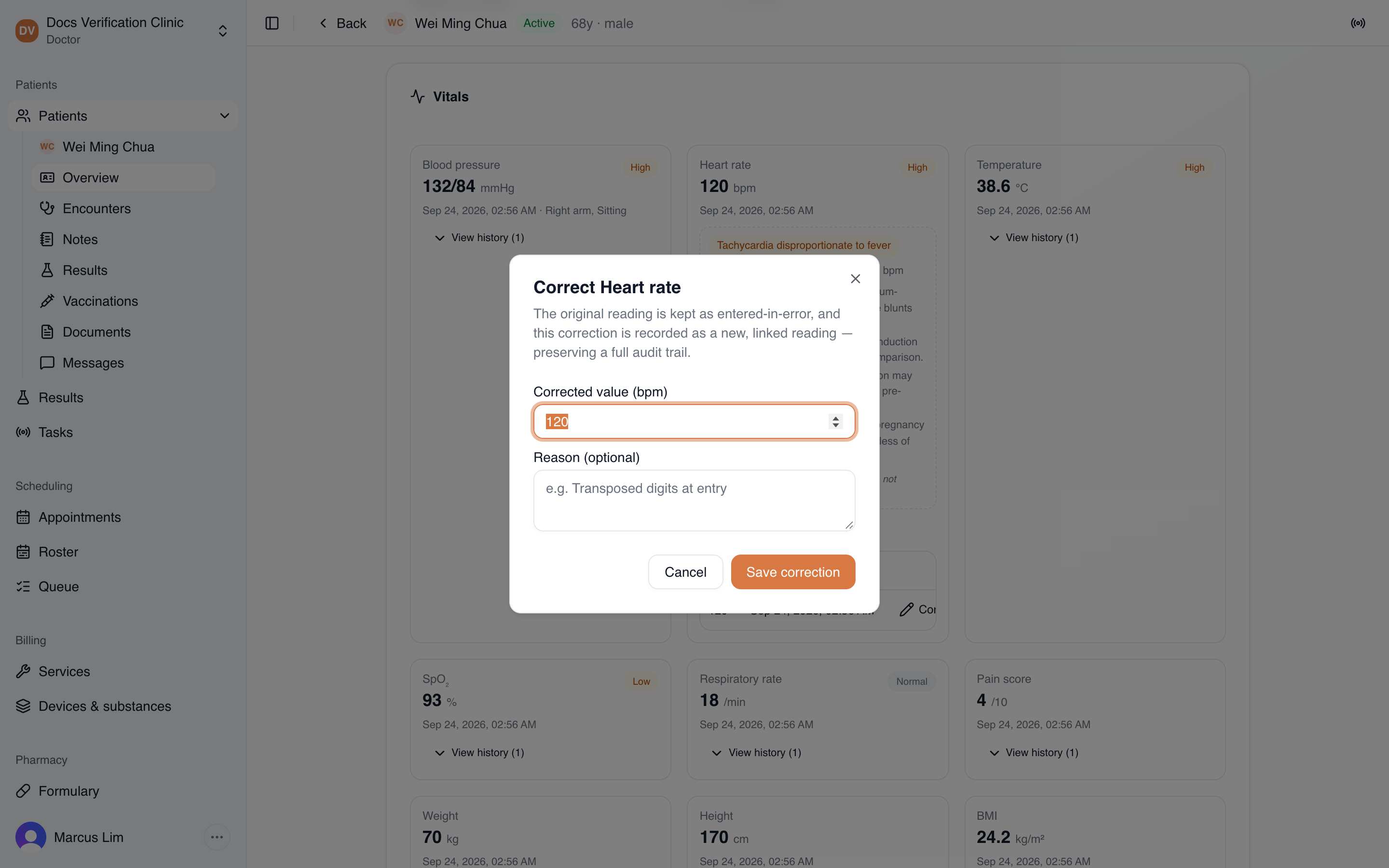
The Correct dialog
The original reading stays in the history with a Corrected label. The correction appears as a new reading that records who corrected it, when, and the reason. The card and trend line show only the corrected value. A reading that was already corrected cannot be corrected again. Correct the newer reading instead.
Related
- Encounters & Clinical Notes: start the encounter you record against.
- Patient Records & Consent: the chart overview.